Built for lifters who train with a plan

TopSet runs your program set by set and shows you how your strength is moving.

Download on the App Store

iOS 18.0 or later · All features free for now

Pick from 100+ proven programs, including 5/3/1, GZCL, Sheiko and Candito, or build your own

Drag the barbell to rotate it

Target weight100 kgPer side: 25 + 15

Follow the plan. Review every week.

Pick a program or build your own. Log every set, read the summary when you finish, and look back at the week before you start the next one.
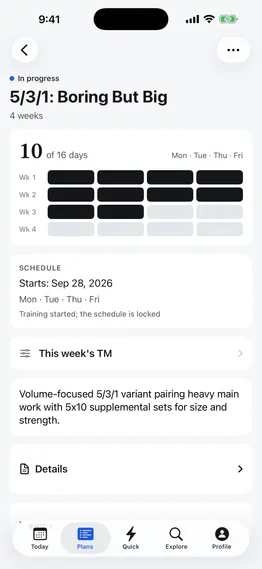
  1. 01Plan

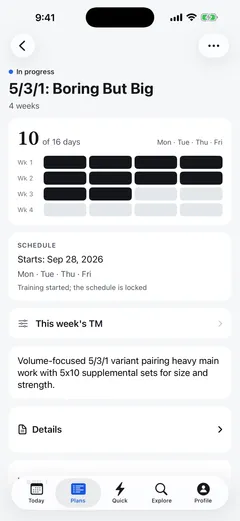
    Build your own, or pick from 100+ programs

    • Lay out training by week, day and set in the plan editor
    • Base weights on %TM, %e1RM or target RPE, using five set types and supersets
    • Copy any program to your plans and change whatever you like
    Plan detail: days done, week by week
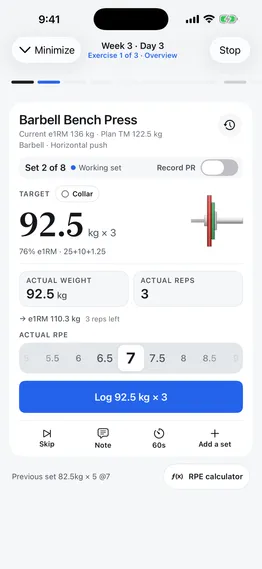
  2. 02Train

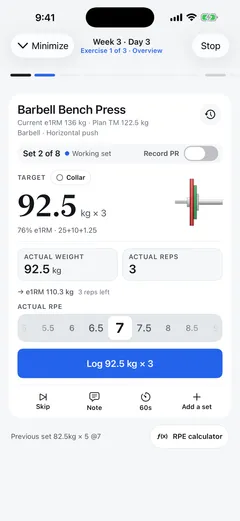
    Every set’s target weight, calculated on the card

    • Targets round to 2.5 kg (or 5 lb), with the plates for each side
    • Weight and reps are pre-filled. Tap Log and the rest timer starts
    • The rest countdown shows on the Lock Screen and Dynamic Island
    Set card: target, plates and RPE wheel
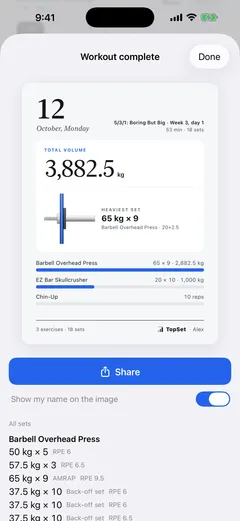
  3. 03Summary

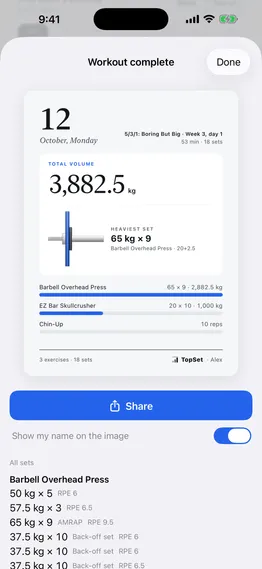
    Your whole session on one screen

    • See duration, sets, total volume and any PRs as soon as you finish
    • Share the summary as a card
    • The Today tab totals the day’s sets and volume. Tap to see every set
    Workout summary and share card
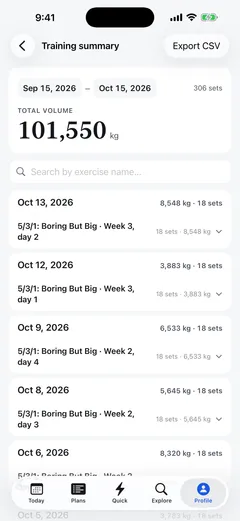
  4. 04Review

    Look back at the week, then start the next

    • Confirm or update each lift’s e1RM weekly, and next week’s weights adjust to match
    • Every lift gets its own e1RM trend chart
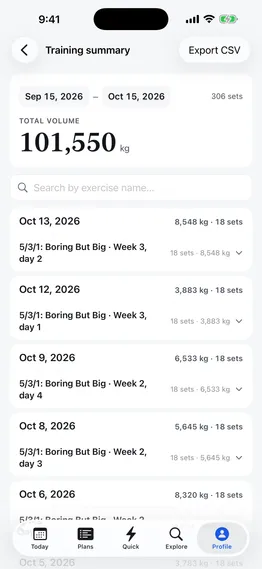
    • Training summary covers any date range and exports to CSV
    Training summary by date range, with CSV export
See all features
Try it

One set. One card.

Change the weight and reps, tap Log, and watch the rest timer run.

  1. 01Target weight, calculatedYour TM × the percentage, rounded to 2.5 kg (or 5 lb)
  2. 02Log in one tapWeight and reps are pre-filled; edits update the live e1RM
  3. 03Rest starts automaticallyIt starts when you log and turns red in overtime
  4. 04Start the next setTap Start next set when you’re ready
Barbell Bench PressCurrent e1RM 117.5 kg · Plan TM 117.5 kgBarbell · Horizontal push
Set 3 of 5Working setRecord PR
Target100 kg × 585% e1RM · 25+15Target RPE 8

→ e1RM 127.2 kg3 reps left
Actual RPE
No RPE55.566.577.588.599.510
Previous set 100kg × 5 @8

Rest runs 6× faster in this demo

Calculators

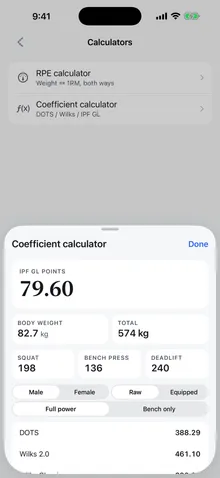
Coefficient calculator and DOTS tiers

Enter your sex, body weight, squat, bench press and deadlift to see your total, five coefficients and your DOTS tier.
Sex
DOTS—
Total—
Wilks 2.0
—
Wilks Classic
—
IPF GL
—
IPF Legacy
—
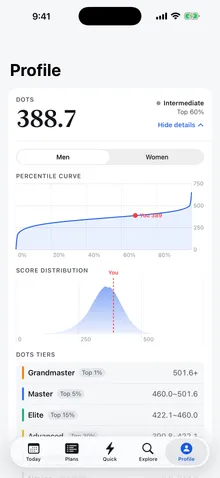
  1. GrandmasterTop 1%501.55+
  2. MasterTop 5%459.96~501.55
  3. EliteTop 15%422.11~459.96
  4. AdvancedTop 30%390.82~422.11
  5. IntermediateTop 60%342.18~390.82
  6. NoviceTop 100%0.00~342.18
Profile: DOTS score, percentile curve and tiers
Coefficient calculator: DOTS, Wilks and IPF GL
  • Tiers are based on OpenPowerlifting’s Tested Raw SBD data and show where your score ranks in that group.
  • The coefficient and RPE calculators in the app work without an account, and every formula cites its source.
All calculators →

FAQ

Can’t find an answer? Email andyrenrj@taigang.club.

Is TopSet free?

All features are free for now.

Can I use it without an account?

As a guest, you can browse public programs and the exercise library and use the coefficient and RPE calculators. To log workouts and use your own plans, you need an account: sign up with email or Sign in with Apple.

Where is my data? Will I lose it if I change phones?

Your data is saved to your account in the cloud. On a new phone, sign in with the same account and pick up where you left off. If you’re offline, keep logging. Your sets upload automatically when you’re back online.

Can I export my data?

Yes. In Training summary, export any date range to CSV, with date, exercise, set type, weight, reps, RPE and notes.

How is e1RM calculated?

TopSet estimates it with RPE multipliers, the same approach OpenPowerlifting uses. If you leave RPE blank, it assumes RPE 10. Finishing a set with Record PR on updates your e1RM.

Do I get rest alerts on my Apple Watch?

Yes, when your iPhone is locked: the rest-end alert goes to your paired Apple Watch. The live countdown also shows on the Lock Screen and Dynamic Island.

What units and languages are supported?

You can switch between kg and lb any time. The app is in English and Simplified Chinese and follows your iPhone’s language. Appearance can be System, Light or Dark.

Is there an Android version?

Not yet. Android is coming soon.

What are the system requirements?

iOS 18.0 or later.

Make every set count.

Download on the App StoreiOS 18.0 or later · All features free for now · Android coming soon